☰

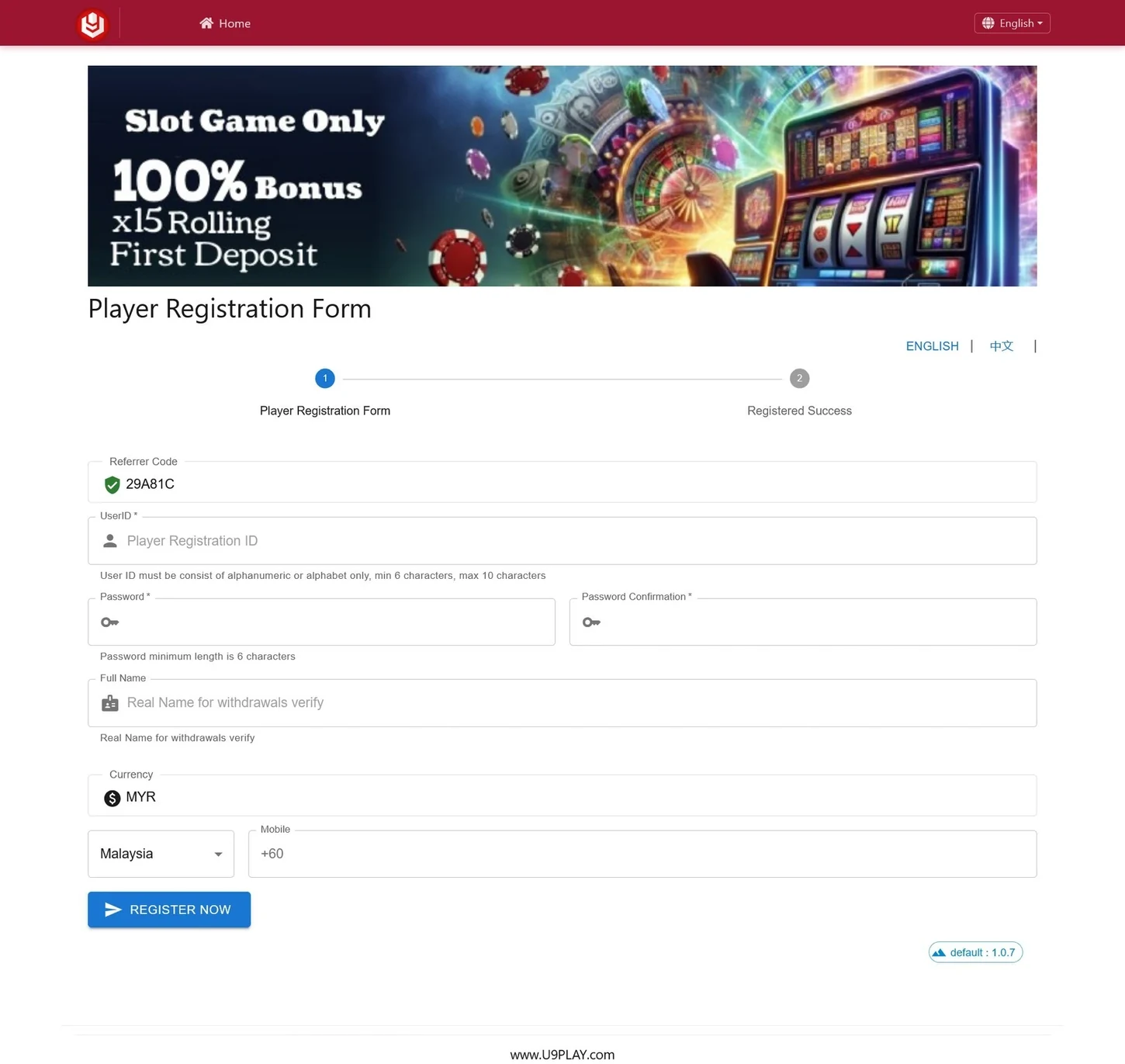
New to U9play? Open the external registration form below to enter your account details. The Malaysia form we reviewed included a UserID, password, full name, MYR currency and a +60 mobile-number field. Follow the current form for the requirements that apply to you.
Independent website notice: U9play.my provides access to a third-party signup form; it does not create or approve player accounts. Referral links may earn us a commission. Check the destination before submitting personal information. Adults 18+ only, subject to applicable laws.
If the form does not display in your browser, open the registration form in a new tab. Verify that the external address is correct before entering your details.
Already registered? Go to the U9play Login page to access your existing account.
Check these fields before filling in the form. The examples come from the registration interface reviewed on 5 October 2026, not a guarantee that every field or setting remains unchanged.
| Form Field | What to Check |
|---|---|
| UserID | The reviewed instructions specified 6–10 alphabetic or alphanumeric characters. |
| Password | The registration screen showed a minimum of 6 characters; confirm the current rule. |
| Confirm Password | Enter the same password again to avoid a mismatch. |
| Full Name | Use the name requested by the provider; its form referenced verification for withdrawals. |
| Currency and Country | MYR and Malaysia appeared in the reviewed form. Confirm the current settings. |
| Mobile Number | The Malaysia example displayed a +60 prefix. Follow the format shown in the live form. |
| Referrer Code | A code was prefilled in the example. Whether it can be edited depends on the live form. |
Read the error shown beside the field. Check the UserID length, allowed characters, password length and whether both password entries match. Password rules can differ between registration and later password changes.
Confirm that the country prefix and number format match the current form. Check the full-name instructions before submitting; avoid sending sensitive identity documents through unrelated links.
Try the direct registration link, another up-to-date browser or a supported mobile device. The third-party provider may block embedded forms, and U9play.my cannot override its account-verification system.
You can try the registration form in a mobile browser. The platform interface we reviewed also displayed Android, Huawei, Apple/iOS and H5 access options; those are device-access choices, not different registration requirements. See the U9play mobile access guide for more information.
Use a unique password, check the external signup address, review applicable privacy and account terms, and keep verification codes private. U9play.my cannot confirm account approval, control the provider’s payment services or access your password. Read our Privacy Policy for this website’s own data practices.
This page embeds an external U9play registration form. You can also open the provider’s signup page directly if the iframe is blocked. The provider handles account creation and approval.
The reviewed form specified 6–10 alphabetic or alphanumeric characters. Follow the latest instructions in the form.
The reviewed screen displayed MYR and a +60 mobile prefix. Verify the current settings before submission.
A referral code was already filled in on the reviewed form, but the screenshot does not establish whether it is mandatory or editable in every case.
Look for field validation messages, verify matching passwords and the requested mobile format, or try the direct signup link if the form does not load.
Follow the provider’s confirmation and any verification instructions. Once you have an active account, use the member login page for sign-in and recovery guidance.
Related information: U9play · Member Login · Mobile Access · Responsible Gaming.