U9
Download our APP
Version now!
DOWNLOAD

U9play Malaysia: Login, Register & Game Guide

Welcome to U9play Malaysia guide. Learn about U9play login, registration, APK download, games and mobile access with simple step-by-step information.

Use the Login or Register buttons to visit the website. Account access, deposits, withdrawals and gameplay are handled on the gaming platform.

U9play Malaysia Review: Account Features and Payment Screens

U9play's account menu brings together deposit settings, withdrawals, statements and betting records. We reviewed 16 interface screenshots to explain the visible options and the notices players should read. This review describes the screens; it does not claim that we completed deposits, withdrawals or gameplay tests.

Screenshot review: . Menus, methods and conditions may change.

Quick Summary

AreaDetails visible in the screenshots
Account menuDeposit, Withdrawal, Statement, MyBets and Profile.
Payment settingsBank, A9wallet/G2point, Touch'n Go and Crypto tabs.
Saved bank accountsThe bank form states a maximum of three accounts and includes a default-account selector.
Provider categoriesSport, LiveCasino, Games, Lottery and P2P in the vendor reference screens.
Account recordsDate filters, a Transactions button and a separate MyBets table.
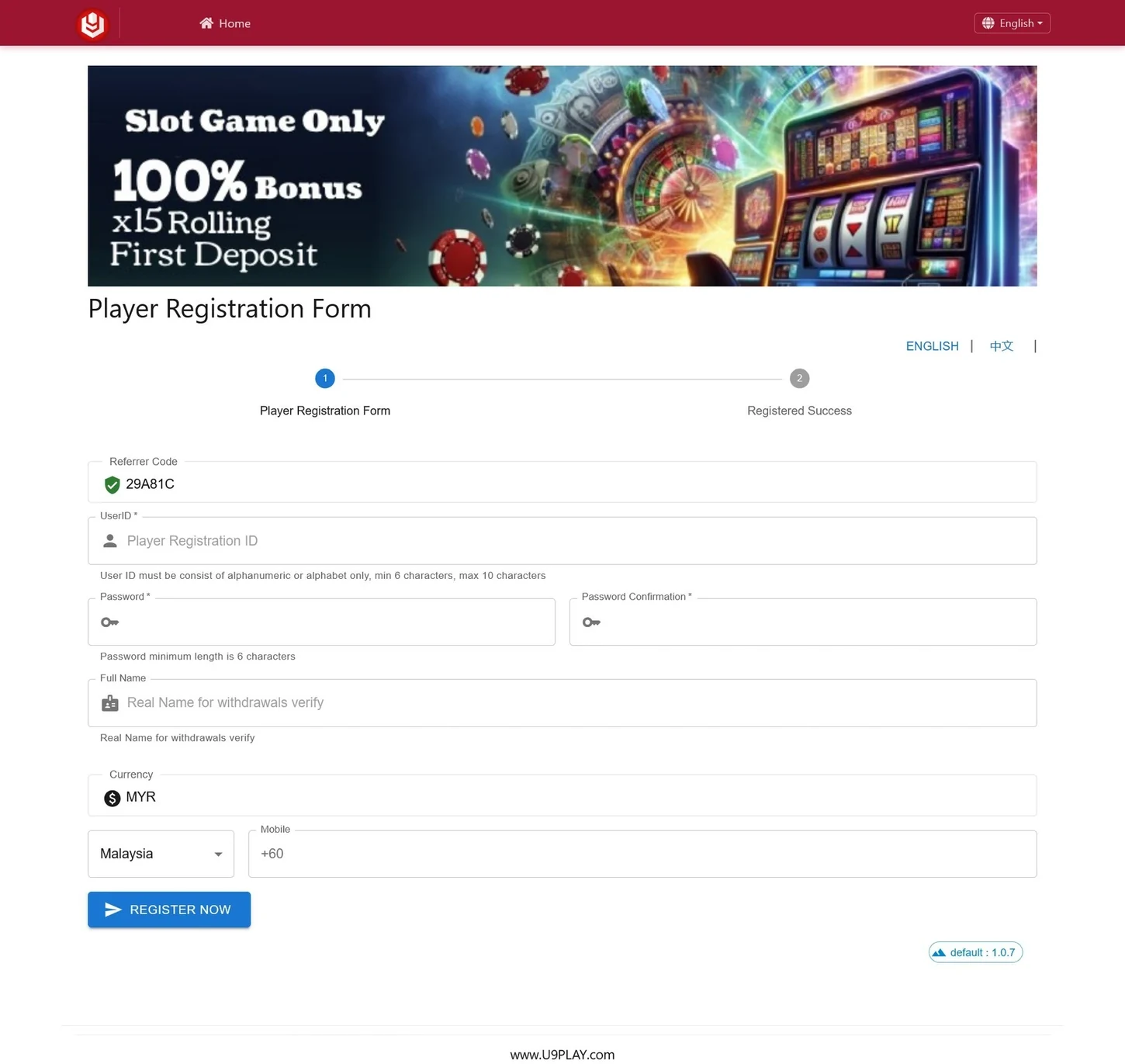
RegistrationThe form shows UserID, password confirmation, full name, currency, mobile and a prefilled referrer code.
Player accessThe welcome screen lists Android, Huawei, Apple iOS and H5 Browser. A separate sign-in panel is labelled for agents.

What Players Can Find

  • Separate account sections: payment settings, statements and betting records have their own menu entries.
  • Several payment-related tabs: the interface separates bank, wallet, Touch'n Go and crypto details.
  • Filters for account records: Statement has date controls, while MyBets has a record filter and Refresh control.
  • Provider references by category: vendor lists group names under Sport, LiveCasino, Games, Lottery and P2P.

Deposit Options and Package Conditions

The captured deposit page shows a package selector, a payment method and a bank selector. Under Online Transfer - Payment Gateway, the displayed choices include VADERPAY (C1), VADERPAY (C2) and SKLPAY.

The selected example is labelled 2% Bonus Package, with Rollover: X3 and Max Bonus: 88 MYR. These labels apply to the captured selection. Check the full package terms, including which amount the rollover applies to and which games count.

Minimum deposit: this screenshot does not show an amount-entry field or a minimum amount. Check the current limit for your selected method before paying.

U9play deposit screen with package, payment gateway and bank selection fields
Deposit screen dated 23 September 2026. The example shows a 2% package, an X3 rollover label and an 88 MYR maximum bonus. It does not show a minimum deposit amount. View full size (new tab)

Withdrawal Minimum and Processing Notice

The withdrawal notice lists a minimum written as $50.00, a bank-account name matching requirement, and possible processing of 1–2 hours during peak hours.

Other account screens use MYR labels, but this notice uses a dollar symbol. Confirm the currency and current withdrawal minimum with the platform. The notice does not establish a usual processing time or guarantee completion within two hours.

U9play bank withdrawal settings with bank selection and a maximum of three saved accounts
Bank-account screen showing a maximum of three accounts, a default-account selector and a minimum notice written as $50.00. The open dropdown shows only part of the bank list. Confirm the withdrawal currency with the platform. View full size (new tab)

The bank-account form also states that players can save up to three accounts and select a default. Only part of its bank dropdown is visible, so this review does not claim a total number of supported banks.

Wallet and Crypto Settings

A9wallet/G2point uses a username field, while Touch'n Go has an ID field. The Crypto tab lists Ethereum and separate USDT fields labelled ERC20, TRC20, BEP20 and SOL. Check the required details, network and current availability directly in the platform.

The App Store, Google Play and AppGallery badges in the wallet screenshot belong to A9wallet/G2point. They do not confirm U9play app-store listings.

View wallet and crypto screenshots
U9play A9wallet/G2point tab showing a wallet username field
The A9wallet/G2point tab has its own username field. The store badges shown here refer to A9wallet/G2point, not to the U9play app. View full size (new tab)
U9play crypto settings showing Ethereum and USDT network-specific wallet fields
The Crypto tab lists Ethereum and USDT fields labelled ERC20, TRC20, BEP20 and SOL. Listed fields do not establish current availability, fees or completed transactions. View full size (new tab)

Game Categories and Listed Providers

The reviewed reference screens group vendor names into five categories. Examples shown include:

  • Sport: M-Sports, Max Bet, SBO and Saba Sport.
  • LiveCasino: RCB988, EZUGI, WM and Pragmatic Play Live.
  • Games: Pragmatic, JOKER, PGSOFT and Habanero.
  • Lottery: KenoLottery, 93 Connect and Perdana3D.
  • P2P: GPoker, LEGaming, V8Poker and M8POKER.

These screenshots come from the Commission tab. The percentage columns are commission entries, not game odds, RTP figures or guaranteed earnings. A provider name in this list does not confirm that every game is currently available.

View the five provider reference screenshots
Sport vendor list in the U9play Commission tab
Sport vendor names shown in the Commission tab. The percentage columns are displayed commission entries, not winning probabilities or promised earnings. View full size (new tab)
LiveCasino vendor list in the U9play Commission tab
LiveCasino reference screen. A name appearing in this list does not verify that every game from that provider is currently available. View full size (new tab)
Games vendor list in the U9play Commission tab
Games vendor reference screen, including labels such as Pragmatic, JOKER, PGSOFT and Habanero. These are vendor entries rather than individual game titles. View full size (new tab)
Lottery vendor list in the U9play Commission tab
Lottery reference screen with entries including KenoLottery, 93 Connect and Perdana3D. The screenshot records the interface as displayed on its capture date. View full size (new tab)
P2P vendor list showing GPoker, LEGaming, V8Poker and M8POKER
P2P reference screen showing four vendor entries. Commission percentages do not describe game RTP or a guaranteed return. View full size (new tab)

Read our casino guide, slots guide or sportsbook guide for the relevant topic.

Profile and Account Controls

The Profile screen brings together account identity, a balance labelled MYR, a bonus balance and bank-detail fields. Visible controls include Change Password, Friend List and Chips Redeem. The captured view shows zero balances; it does not show a completed redemption or payout.

View the profile screen
U9play profile screen with MYR balance, bonus balance and account controls
Profile interface with balance and account-control sections. The displayed values describe this captured account view only. View full size (new tab)

Statements and Betting Records

The Statement screen has From and To date fields, a Go control and a Transactions button. Check the selected date range when looking for an entry. MyBets has Details, Selection, Odds, Stake and Status columns, plus a filter and Refresh control.

The examples show zero statement totals and “No Record” in MyBets. They illustrate the layout and do not demonstrate completed payments or game results.

View Statement and MyBets screenshots
U9play Statement screen with date filters, Transactions button and activity totals
Statement screen with date filters and a Transactions button. The example shows zero totals; it is an interface illustration, not evidence of a successful payment. View full size (new tab)
U9play MyBets screen with Details, Selection, Odds, Stake and Status columns
MyBets displays record columns and a filter. This captured view says “No Record” and contains no gameplay results. View full size (new tab)

Player Access, Registration and App Options

The welcome screen separates player access from agent login. Its player section lists Android, Huawei, Apple iOS and H5 Browser. The sign-in panel asks for an Agent ID and password and is labelled for agents only.

Use our login guide for player account access and the download guide to check current device instructions. The listed access options do not establish an APK version, file size or tested compatibility on every device.

View the player-access and agent-login screen
U9play welcome screen separating player download options from an agent login panel
The player section lists Android, Huawei, Apple iOS and H5 Browser. The separate login panel is labelled for agents, so it should not be described as the player login form. View full size (new tab)

The Player Registration Form shows UserID, password, password confirmation, full name, currency and mobile fields, plus a prefilled referrer code. A mobile field alone does not establish an SMS-verification step. The screenshot also does not show whether the prefilled referral code can be omitted.

Read our registration guide and follow the requirements on the current form. Check the destination address before entering personal details.

View the player registration form
U9play player registration form with UserID, password, full name, currency and mobile fields
Captured registration form with a referrer code already populated. The promotional banner above it is subject to separate offer terms and does not establish an offer available to every account. View full size (new tab)

Daily Check-in and PK Promotions

The Daily Check-in screen displays a 28-day calendar and gift markers on days 7, 14, 21 and 28. Its captured reward message says “No reward”. The terms shown include eligibility conditions and a 3x rolling requirement for withdrawal; check the current full terms before relying on a reward.

The PK screen shows Auto Match and PK Friend options and a displayed prize amount. These describe the captured promotion interface, not money already won or paid. Read the promotion guide and check applicable product, round and eligibility conditions.

View Daily Check-in and PK screenshots
U9play Daily Check-in calendar with gift markers, reward message and terms
Daily Check-in screen showing a calendar and its conditions. Gift markers do not confirm that a reward was claimed or paid. View full size (new tab)
U9play PK Program screen with Auto Match, PK Friend and a displayed prize amount
PK Program interface with matching options and promotion terms. The displayed prize is not evidence of a completed payout. View full size (new tab)

Things to Check Before Using the Platform

  • Eligibility: check the age and legal requirements that apply to you.
  • Payment conditions: confirm the currency, limits, account-name requirements and current method availability.
  • Promotion rules: read rollover conditions, eligible games, expiry dates and withdrawal restrictions.
  • Account protection: check the destination address and never share your password or OTP.
  • Spending limits: set a budget, only use money you can afford to lose and do not chase losses.

For an account or withdrawal problem, contact platform support with the relevant reference. U9play.my cannot view, change or release a player's balance. Read our responsible gaming information for further guidance.

Our Summary

The reviewed interface provides separate payment settings, account-record screens and provider reference lists. These screenshots help players understand the menus and displayed conditions. They do not establish payout reliability, security, licensing or app performance.

U9play.my is an independent information website. Some platform links are referral links, and we may earn a commission if you sign up through them. Check current information directly with the platform before relying on a payment amount, method or offer.

Visit the website →

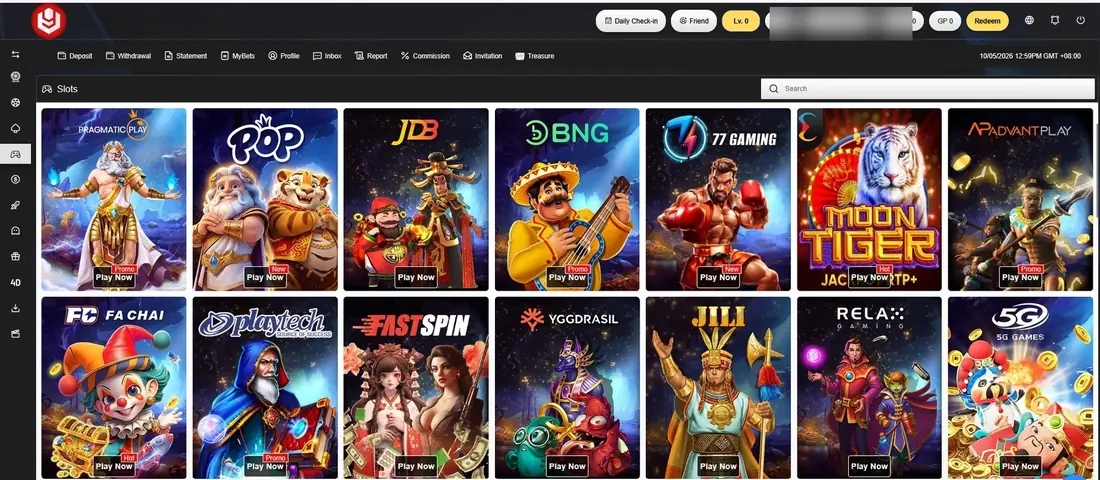
Game Categories and Listed Providers

Tap a tab to see the providers listed in each category. Names and availability can change. You play on the official gaming site, not on this website.

How to Get Started in 3 Steps

1

Register

Tap Register. You will go to the sign-up page. Enter your username, password and phone number.

2

Choose How to Play

Play in your browser, or use the Android APK or iOS guide. Only download from links you trust.

3

Log In and Read the Rules

Log in to your account. Check the terms, promotions and limits before you deposit.

U9play mobile app screen

Play on Your Mobile

You can access U9play through supported mobile browsers, or use the app options listed on the download page. Only download using the official links provided here - never install files from unknown sources. The buttons below take you to the download page.

  • ⚡ App Information
  • 🛡 Category: Gaming
  • 📱 Mobile Access: Android, iOS, Huawei and Browser

App details may change. Check the latest download page.

QR code for the U9play app download page

Scan to Download

♦ Key Features of U9play

🎮

Many Games, One Account

The platform lists live casino, slots, sports, fishing, lottery and 4D games. The platform lists multiple gaming categories under the same account access system.

📱

Mobile and Browser Access

You can play in a browser or use the app for Android, iOS or Huawei. A download is optional.

💳

Payment Options

Bank transfer, e-wallets, Touch 'n Go and crypto options are displayed in the payment section. Deposit and withdrawal limits can change, so check the current payment page before making any transaction.

🎧

Live Chat Support

The platform states live chat is open 24/7 for account, payment and game questions. For any problem with your account, contact support directly.

Promotions and Rewards

The site lists daily login rewards, points and member offers. Every offer has terms, such as turnover rules. Read them on the official gaming site before you accept.

About U9play.my

U9play.my is an information website for players in Malaysia. We do not operate the gaming service or run any games. We write simple guides on login, registration, games, promotions and app access, so players can understand the basics before visiting. Our guides are based on independent research and publicly available platform information. Details can change, so always check the official site for the latest rules.

Some links on this site are referral links. We may earn a commission if you sign up through them.

About the Platform: The platform information available online describes gaming categories, account access options and mobile access features, including live casino, slots, sports, fishing, lottery and 4D games under one account.

Target Region:Malaysia
Currency:MYR
Languages:English and Malay
Supported Devices:Android, iPhone, Huawei and desktop
Game Categories:Live casino, slots, sports, fishing, lottery, P2P and table games
Account Options:Browser (H5) login and registration
Customer Support:Live chat, 24/7 (as listed on the platform)
Age Rule:18+ (as listed on the platform). Malaysian law may set a higher age for some activities.

Facts as listed by the platform at the time of writing.

Why Players Search U9play Malaysia Guide?

Players in Malaysia often look for simple information about account access, mobile compatibility and available game categories. Our guide explains these sections clearly so users can understand the available features before using the service.

What New Players in Malaysia Usually Ask First

What is U9play?

The service provides mobile and desktop access with different gaming categories, account services and platform features for users.

Is U9play.my the official U9play website?

No. U9play.my is an information website. We do not run the U9play platform, and we cannot see or change your account. Registration, login, deposits, withdrawals and gameplay all happen on the official gaming site. Some links on our site are referral links, and we may earn a commission if you sign up through them.

Is online gambling legal in Malaysia?

Gambling laws in Malaysia are strict. Some types of gambling are restricted or not allowed, and Muslims face extra rules under Syariah law. This website gives information only. It does not tell anyone to break the law. Please check the laws that apply to you before you play. If you are not sure, ask a qualified legal adviser.
How do I create an account?

Tap Register on this site to open the sign-up page. Enter a username, password and mobile number, Then complete the required registration steps shown on the current form. The process is usually short, but the exact time can vary. A referral code is optional. Always check that you are on the correct page before entering your details.

What is the minimum deposit?

The minimum deposit amount depends on the selected payment method and current platform rules. Check the latest deposit page before making a payment, and only deposit money you can afford to lose.

What is the minimum withdrawal?

The withdrawal screen shows a minimum notice written as $50.00. Currency and limits may change, so confirm the latest withdrawal requirements before submitting a request. Also make sure your account name matches your bank records exactly, since a mismatch can delay your payout.

How long does a withdrawal take?

The withdrawal notice shows possible processing of 1–2 hours during peak hours. Actual processing time may vary depending on payment method and account checks.

What payment methods are available?

The payment section displays bank options, A9wallet/G2point, Touch 'n Go and cryptocurrency settings. You can save up to three bank accounts and pick one as your default. Available methods may change, so check the current payment page.

Can I play on my mobile phone?

Yes. The service works in a mobile browser and also lists app options for Android, iOS and Huawei. You do not need a computer.

Do I need to download an app?

No. Browser access is available on supported devices, so the app is optional. If you want the app, use the download links on the official site. Never install files from unknown senders.

What games can I play?

Listed categories include live casino (baccarat, roulette, blackjack and sic bo), slots, sports betting, fishing games, lottery and 4D games. One account and one shared balance are described as covering these categories.

How do bonuses and rewards work?

Available offers include daily login rewards, points and member-only promotions. Points may be redeemable for credits or cash, depending on the applicable rules. Every offer has its own terms, such as turnover rules and time limits. Read the conditions before accepting any offer.

What should I do if my withdrawal is delayed?

First, check that your bank account name matches your U9play account name. Then contact U9play live chat and share your withdrawal reference number. We cannot see or fix your withdrawal, because payments are handled by U9play.
Is my personal data safe?

We cannot check U9play's security, so we cannot promise that your data is safe. Read U9play's privacy policy before you sign up. To protect yourself, use a strong and unique password, never share your OTP or password with anyone, and only log in from links you trust. We do not ask for your U9play password on this website.

Can I set deposit limits?

At the time of writing, we could not see a deposit-limit tool in the main menu of U9play. Ask U9play support if one is available. Set your own budget before you play, only use money you can afford to lose, and never chase losses.
How do I contact customer support?

For account, deposit, withdrawal or game questions, contact U9play support through the live chat on the official gaming site. For questions about this website, use our Contact Us page.

How can I avoid fake U9play websites?

Check the web address before you type any details. Only use links you trust. Never pay money into a personal bank account, and never trust someone who messages you on social media and says they are from U9play. Never share your OTP or password. If a page looks wrong, close it and contact U9play support.

Does U9play have an agent program?

U9play mentions an agent program. The rules, commissions and payouts are set by U9play. Ask U9play support for the current terms. We cannot promise any earnings, so do not join expecting guaranteed income.

What should I know before I start playing?

Gambling should be for fun, not a way to make money. Only bet what you can afford to lose. Set a limit before you play, and never chase losses. Do not play if you are under age or if gambling is not allowed for you.

Need help? If gambling affects your life, money or relationships, you can call Befrienders Malaysia (03-7627 2929) or Talian Kasih (15999).